How to Format WhatsApp Business Messages to Sell More (Complete 2026 Guide)
2026-06-10 · 12 min de leitura · Bruno Vieira
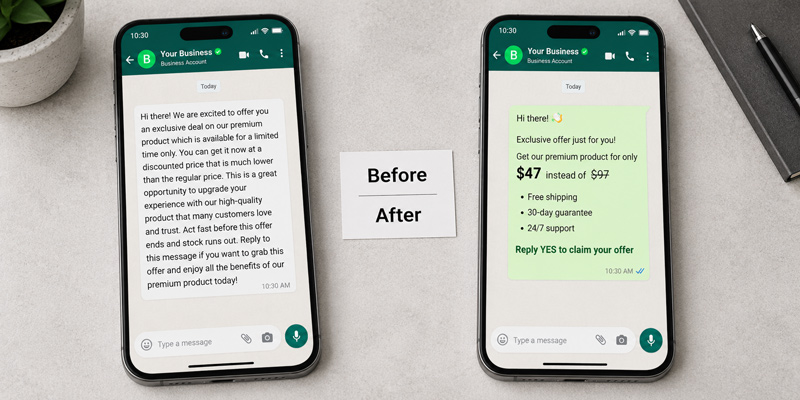
WhatsApp is Brazil's biggest store. and the message is your counter
Over 148 million Brazilians use WhatsApp, with 98.9% penetration among internet users. It's not a communication channel. it's infrastructure. The data from 2025-2026 confirms what many sellers already felt:
- 95-98% open rate on WhatsApp Business messages. vs 20-25% for email marketing
- 45-60% conversion in conversational commerce via WhatsApp, up to 12x higher than traditional channels
- 7x more conversions than traditional e-commerce (Chat Commerce Report 2025, 782M messages analyzed)
- 72.4% of consumers are more likely to buy from brands that offer messaging (Kantar/Meta, 11,056 adults across 22 countries)
- 66% of users have made a purchase after communicating with a brand on WhatsApp
But there's one detail that separates businesses that harness this potential from those that just "have WhatsApp": message quality. A confusing, unstructured message hard to read on a 6-inch phone won't convert. no matter how many people open it.
What is WhatsApp message formatting (and why it matters for sales)
Formatting means applying visual styles to text. bold, italic, strikethrough, lists. to create information hierarchy and guide the reader's eye. On WhatsApp, this is done with special characters (Markdown markers) placed around text. The app automatically renders the style on the recipient's screen.
Why formatting increases conversion
People read messages on small screens in a non-linear way: the eye scans for visual anchors. bold words, numbers, lists. If the message is a single text block with no hierarchy, the reader doesn't know where to focus and abandons reading.
- Reduces cognitive load. the customer grasps the main point in 2 seconds
- Highlights what matters. price, deadline, main benefit
- Conveys professionalism. reinforces brand credibility
- Increases response rate. clearer messages generate more interactions
- Facilitates decision-making. customers see exactly what they need to say yes
All native WhatsApp formatting features
WhatsApp supports 8 text formatting types natively. Here's how each one works in practice. with real examples of how they look in the customer's chat.
1. Bold. *text*
When to use: Highlight keywords, prices, deadlines, product names, and CTAs.
📱 How it looks on WhatsApp:
⌨️ How to type: *text*. wrap the word with asterisks
💡 Maximum 2-3 bold words per message. If everything is bold, nothing stands out.
2. Italic. _text_
When to use: Customer testimonials, slogans, quotes, complementary information.
📱 How it looks on WhatsApp:
⌨️ How to type: _text_. use underscores before and after
💡 Testimonials in italic create a quote-like visual effect. no extra quotation marks needed.
3. Strikethrough. ~text~
When to use: Show original price before discount (price anchoring).
📱 How it looks on WhatsApp:
⌨️ How to type: ~text~. use tildes before and after
💡 Strikethrough + Bold is the most powerful discount format. The eye sees the old price crossed out and the new one highlighted. an urgency trigger.
4. Monospace. `text`
When to use: Tracking codes, payment codes, temporary passwords, data that must be copied precisely.
📱 How it looks on WhatsApp:
⌨️ How to type: `text`. use backticks before and after
💡 Monospace data is perceived as more precise and trustworthy. Always use for technical and financial information.
5. Bullet list
When to use: List benefits, product features, order items, differentiators.
📱 How it looks on WhatsApp:
⌨️ How to type: - item. hyphen + space at the start of each line
💡 Lists have 40% higher complete read rates than equivalent paragraphs in mobile messages.
6. Numbered list
When to use: Process steps, instruction sequences, payment or delivery stages.
📱 How it looks on WhatsApp:
⌨️ How to type: 1. item. number + period + space at the start of each line
💡 Numbered lists reduce customer anxiety. they show it's just a few simple steps.
7. Block quote
When to use: Highlight critical information, urgent deadlines, important warnings that cannot be ignored.
📱 How it looks on WhatsApp:
⌨️ How to type: > text. greater-than sign + space at the start of the line
💡 Block quotes work as visual "alert boxes." Ideal for deadlines and critical notices.
8. Code block
When to use: Sending scripts, structured data, or technical templates for IT teams. For everyday B2C sales, inline monospace (single backtick) works fine.
📱 How it looks on WhatsApp:
How to combine formatting for maximum impact
You can combine bold and italic on the same word: *_text_* renders as text. The strikethrough + bold combo (~old~ *new*) is ideal for showing before/after pricing.
Note: WhatsApp does not support native underline. Any underlined text you see comes from special Unicode characters.
The anatomy of a sales message that converts
Based on patterns with the highest response rates on WhatsApp Business, here's the structure that works:
Applied example. Product offer
Compare with the same message without formatting: a single text block with no visual hierarchy, where the CTA gets lost. The difference isn't in the content. it's in the presentation.
20+ Ready-to-copy message templates
Use these templates as starting points. Replace the fields in [ ] with your business information.
Initial approach / First contact
Product presentation with pricing
Follow-up after proposal
Flash sale / Urgency
Order confirmation / Post-sale
Inactive customer re-engagement
Auto greeting message
Quote response
Payment reminder (friendly tone)
New collection / Launch
Review / Feedback request
Formatting mistakes that hurt your sales
❌ Too much bold
When everything is bold, nothing stands out. Rule: Maximum 2-3 bold words per message, always on high-value information (price, deadline, CTA).
❌ Single block of text
On mobile, a giant text block looks like a wall. Complete read rate: near zero. Rule: Break into short paragraphs. Maximum 2-3 lines per paragraph.
❌ CAPS LOCK, too many emojis, meaningless formatting
Uppercase text is perceived as aggressive. Emoji chains look like spam. Each style should have a reason: bold = important, italic = quote/complement, strikethrough = before/after.
Unicode special fonts: when to use them
Beyond native formatting, WhatsApp renders any Unicode character. allowing you to use "alternate fonts" that look like different styles. Available styles: bold serif (𝐍𝐚𝐦𝐞), cursive italic (𝓃𝒶𝓂𝑒), script (𝓃𝒶𝓂𝑒), and small caps (ɴᴀᴍᴇ).
✅ Use Unicode for: brand name or slogan, exclusive collections, formal message signatures. ❌ Avoid in: long texts, critical information like pricing, and when the recipient uses older systems.
Checklist: is your message ready to send?
- Does the message have one clear main idea?
- Is the benefit or CTA in bold and visible?
- Is the text broken into short paragraphs (max 3 lines)?
- Are there at most 3 bold words per message?
- Is the CTA unique and specific (reply YES / click here / type SHOW)?
- Does the message make sense when scanned in 5 seconds?
- Is the tone aligned with the customer's history?
- Are there no spelling mistakes?
- Does the message feel like it was sent by a human, not a bot?
Keyboard shortcuts for faster formatting on WhatsApp Web
On WhatsApp Web: Ctrl+B / Cmd+B for bold, Ctrl+I / Cmd+I for italic, Ctrl+S / Cmd+S for strikethrough, Ctrl+M / Cmd+M for monospace. Select the text and press the shortcut.
Free tool: format your messages without memorizing anything
The ZapToMe Message Formatter lets you apply bold, italic, strikethrough, and code with one click, preview the result in real time inside a WhatsApp bubble, convert text to 8 special Unicode fonts, and use the "AI Format Suggestion" button to generate a professional version of your text automatically. It's free, works in your browser, and requires no sign-up.
FAQ about WhatsApp Business formatting
Does formatting work on WhatsApp Business the same as personal WhatsApp?
Yes. The formatting markers work identically in both apps. The only difference is Business's extra features (labels, hours, catalog). text formatting is the same platform.
Can I use bold in auto replies?
Yes. Quick reply, greeting, and away message templates accept formatting with the same markers. Include asterisks and underscores normally in the template text. the app renders them correctly.
Does it work on the WhatsApp Business API?
Yes, with one caveat: in Meta-approved templates (HSM), the formatting must be within the approved template text. For messages within the 24-hour customer window, formatting works normally.
Why isn't my bold working?
Common mistakes: space between asterisk and text (* text * doesn't work, *text* does), or using the numeric keypad asterisk instead of the standard one. Make sure there's no line break between the markers.
Conclusion: formatting is strategy, not aesthetics
The difference between a message that sells and one that's ignored is rarely about the product. It's about how the information is presented. In a channel where 98% of messages are opened, the battle is no longer about deliverability. it's about attention. And attention is won with visual clarity, information hierarchy, and a single well-placed call to action.
Use the templates in this guide as a starting point. Adapt them to your brand's tone and each customer's context. And when you need to format quickly. without memorizing markers. the ZapToMe Message Formatter is available for free.
Free Formatter: Stand Out With Style
Apply bold, italic, strikethrough, and special fonts with one click. See the real-time preview before sending.
Format Your Message Now